
All Categories
-
Car remote controls
-
OEM car key
-
Car key shells
- Enhanced key shell
-
Emergency&Flip key blade
- Motorcycle key shells
- Motorcycle key remotes
- Heavy machinery key
-
Car lock
- Car lock accessories
-
Locksmith tools
- Car&Motor Lishi 2 in 1
- Sided groove-Lishi 2 in 1 Inner groove-Lishi 2 in 1 Flat key-Lishi 2 in 1 Motorcycle Lishi 2 in 1
- Residential tools-①
- Wafer lock tool Cross lock tool Magnetic lock tool Specialized lock tool Straight shackle padlock tool
- Transponder Chip
- Keydiy Products
- VVDI/Xhorse Products
- KYDZ Products
-
Autel/Lonsdor/Yanhua/Others
- Car alarm /OBD diagnostic tools
-
Key protector/TPU/Key Cover
- Cutting Machine
Faster delivery,Better products,Best service!!
Cart
Loadding...
Home>Car alarm /OBD diagnostic tools>Face to Face Remote>16/32/60 channel full-frequency 280-915Mhz powerful cloning remote , black 6-button, for roller shutters, garage doors, and retractable gates

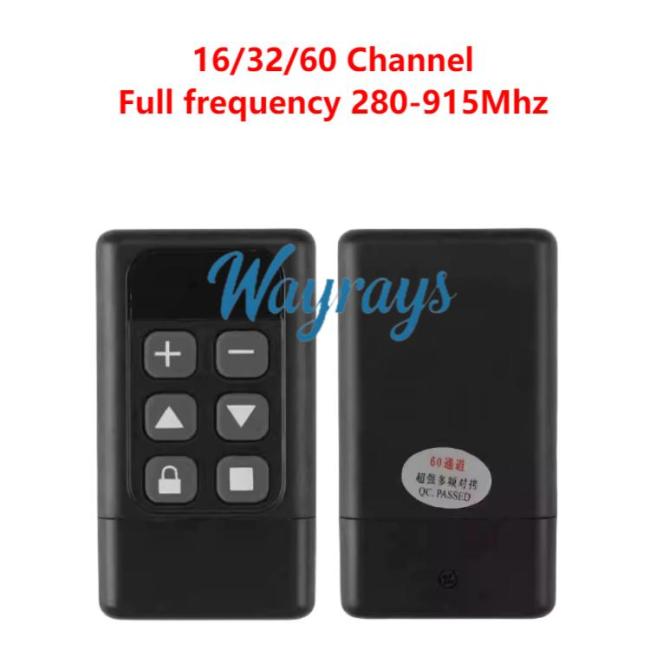
16/32/60 channel full-frequency 280-915Mhz powerful cloning remote , black 6-button, for roller shutters, garage doors, and retractable gatesItem NO.: FFR-YK020
US$ 3.00
- Choose Model
- A-16 Channel B-32 Channel C-60 Channel
-
Customized Requirements
- Quantity
-
Stock ( 19999998 ) MOQ ( 5 )
Adding to cart succeed

16/32/60 channel full-frequency 280-915Mhz powerful cloning remote , black 6-button, for roller shutters, garage doors, and retractable gates
color:red,size:xxl
Subtotal: US$ 0
View My Cart
-
- Product Name: 16/32/60 channel full-frequency 280-915Mhz powerful cloning remote , black 6-button, for roller shutters, garage doors, and retractable gates
- Item NO.: FFR-YK020
- Weight: 0.031 kg = 0.0683 lb = 1.0935 oz
- Category: Car alarm /OBD diagnostic tools > Face to Face Remote
- Creation Time: 2026-01-04
How to copy a remote control?
Step 1
Clearing the remote control code
Press and hold the two buttons on the top row of the remote control simultaneously. The indicator light will flash once, then flash rapidly after about 2 seconds, indicating successful clearing. After clearing, pressing any of the four buttons on the remote control will only cause the indicator light to flash once and then turn off.
Step 2
Remote control copying
Place the original remote control and the copying remote control side by side (preferably hold the copying remote control in your right hand). Simultaneously press any button on both remote controls. The indicator light on the copying remote control will flash rapidly, indicating successful copying. Copying takes only 1 second. Repeat the same method for the other three buttons.
Step 3
Remote control recovery
If you accidentally cleared useful codes, before copying other remote controls again, you can simultaneously press the two buttons on the bottom row of the remote control for 2 seconds. The indicator light will flash rapidly, indicating successful recovery. Simple operation method for copying the remote control: First, clear our company's copying remote control by simultaneously pressing and holding the two buttons on the top row. After a few seconds, the indicator light will flash continuously, indicating that it has been cleared. Then, hold down a button on your own remote control with your left hand, and hold down a button on my remote control with your right hand. After a few seconds, the light on my remote control will flash, indicating successful copying. The two remote controls should be close together for copying; placing them back-to-back will yield better results.
You May Also Like





- Help center
- About Us
- Contact Us
- My order
- Change password
- About Shipping
- Shipping Methods
- About Payment
- Payment Methods
- About Return
- Return Policy&Return Method
- Newsletter
Copyright © 2006-2020 SHOP INC. All Rights Reserved.
Customer Reviews