
All Categories
-
Car remote controls
-
OEM car key
-
Car key shells
- Enhanced&Upgraded key shell
-
Emergency&Flip key blade
- Motorcycle key shells
- Motorcycle key remotes
- Heavy machinery key
-
Nxp Killer & Apdaters
-
Car lock
- Car lock accessories
-
Locksmith tools
- Car&Motor Lishi 2 in 1
- Sided groove-Lishi 2 in 1 Inner groove-Lishi 2 in 1 Flat key-Lishi 2 in 1 Motorcycle Lishi 2 in 1
- Residential tools-①
- Wafer lock tool Cross lock tool Magnetic lock tool Specialized lock tool Straight shackle padlock tool
- Residential tools-②
- Bump key tool Peephole tool Remove sth tool Door gap insert tool lock forcing&Torsion tool
- Car tools
- Airbag Remove sth/Open car key tool Pry bar&Push hook Car quick open tool Car key duplication model
- Transponder Chip
- KYDZ Products
- Keydiy Products
- VVDI/Xhorse Products
-
Autel/Lonsdor/CGDI/Others
-
Key protector/TPU/Key Cover
- Cutting Machine
Faster delivery,Better products,Best service!!
Cart
Loadding...
Home>VVDI/Xhorse Products>VVDI Adapter>XDMQBAGL Xhorse MQB48 Adapters for VVDI MLB Tool GL Version (No Tokens Required)


XDMQBAGL Xhorse MQB48 Adapters for VVDI MLB Tool GL Version (No Tokens Required)Item NO.: VVDI-SPQ019
US$ 75.00
-
Customized Requirements
- Quantity
-
Stock ( 9999998 )
Adding to cart succeed
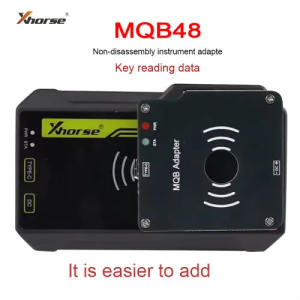
XDMQBAGL Xhorse MQB48 Adapters for VVDI MLB Tool GL Version (No Tokens Required)
color:red,size:xxl
Subtotal: US$ 0
View My Cart
-
- Product Name: XDMQBAGL Xhorse MQB48 Adapters for VVDI MLB Tool GL Version (No Tokens Required)
- Item NO.: VVDI-SPQ019
- Weight: 0.1 kg = 0.2205 lb = 3.5274 oz
- Volume: 420 CBM
- Category: VVDI/Xhorse Products > VVDI Adapter
- Creation Time: 2025-05-19
XHORSE XDMQBAGL MQB Adapter, with MLB equipment, does not need to disassemble the instrument but only the key, and only needs to solder two wires. With low risk, simple operation, it can add keys for most MQB48 keys.
Product Features:
1. Supports most MQB48 keys
2. Low-risk & simple operation – No need to disassemble the instrument
3. Works with MLB equipment for seamless key addition

MLB+MQB adapter instructions
VVDI2 device
1. Use MLB device + MQB adapter to read IMMO data from MQB48 key.
2. Use VVDI2 to load the IMMO data read in the first step: generate key, learn key (VVDI2 needs to enable MQB function, does not need MQB48 NEC35XX locking function)
KEY TOOL PLUS / KEY TOOL MIDI device
1. The tablet device is directly connected to MLB device + MQB adapter, and IMMO data can be read from MQB48 key.
2. The tablet device loads the IMMO data read in the first step: generate key, learn key (the tablet device needs to have fourth-generation authorization, does not need MQB48 NEC35XX locking function)
Warm notice: It is strongly recommended that customers collect data on a computer instead of using a tablet.Wiring & Connection Guide:
VVDI MLB Tool MQB48 Wiring Diagram:Remove one capacitor (near the IC position) on the original key, as shown in the diagram.
Solder the socket cables to the original key according to the specified colors in the wiring diagram.


Connection:


You May Also Like






Recently Viewed
-

-
-
-
-
-
-
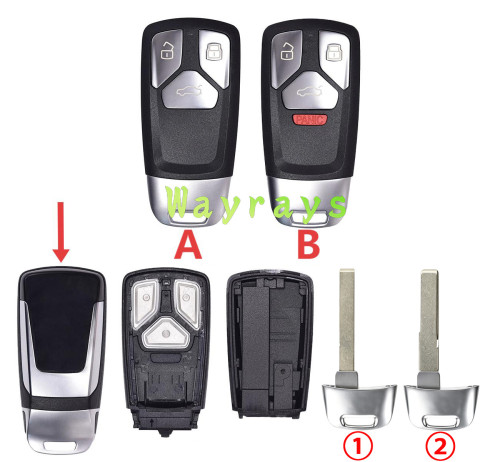 For Audi Q7 key shell without logoUS$ 3.17 ~ US$ 3.60
 -
 For Bmw X1 X3 X5 X6 F chassis emergency key bl...US$ 0.96 ~ US$ 1.20
 -

-
-

-
- Help center
- About Us
- Contact Us
- My order
- Change password
- About Shipping
- Shipping Methods
- About Payment
- Payment Methods
- About Return
- Return Policy&Return Method
- Newsletter
Copyright © 2006-2020 SHOP INC. All Rights Reserved.
Customer Reviews