
All Categories
-
Car remote controls
-
OEM car key
-
Car key shells
- Enhanced key shell
-
Emergency&Flip key blade
- Motorcycle key shells
- Motorcycle key remotes
- Heavy machinery key
-
Car lock
- Car lock accessories
-
Locksmith tools
- Car&Motor Lishi 2 in 1
- Sided groove-Lishi 2 in 1 Inner groove-Lishi 2 in 1 Flat key-Lishi 2 in 1 Motorcycle Lishi 2 in 1
- Residential tools-①
- Wafer lock tool Cross lock tool Magnetic lock tool Specialized lock tool Straight shackle padlock tool
- Transponder Chip
- Keydiy Products
- VVDI/Xhorse Products
- KYDZ Products
-
Autel/Lonsdor/Yanhua/Others
- Car alarm /OBD diagnostic tools
-
Key protector/TPU/Key Cover
- Cutting Machine
Faster delivery,Better products,Best service!!
Cart
Loadding...
Home>Car alarm /OBD diagnostic tools>Anti-theft device>For Cars>Universal 12V keyless car alarm system with remote central locking and keyless entry
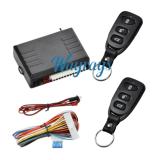
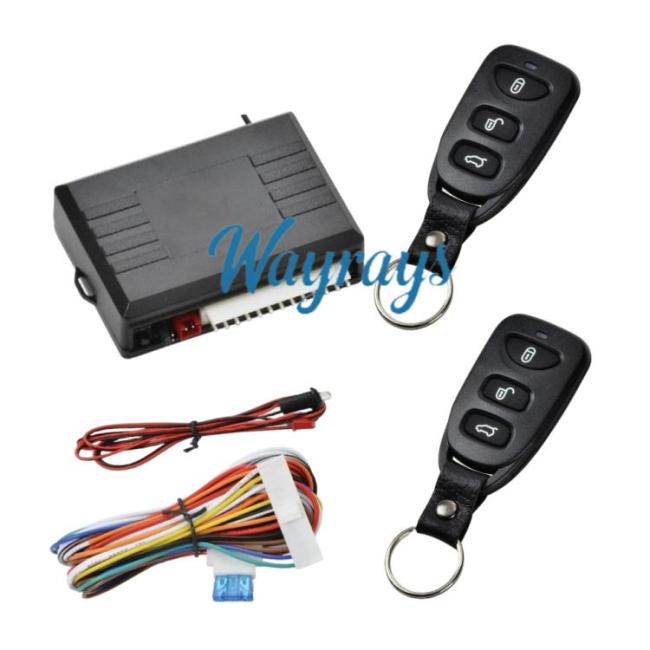
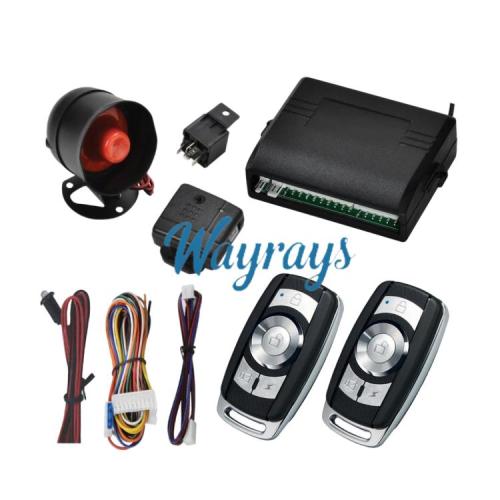
Universal 12V keyless car alarm system with remote central locking and keyless entryItem NO.: FDQ-QC001
US$ 10.00
-
Customized Requirements
- Quantity
-
Stock ( 9999999 )
Adding to cart succeed

Universal 12V keyless car alarm system with remote central locking and keyless entry
color:red,size:xxl
Subtotal: US$ 0
View My Cart
-
- Product Name: Universal 12V keyless car alarm system with remote central locking and keyless entry
- Item NO.: FDQ-QC001
- Weight: 0.031 kg = 0.0683 lb = 1.0935 oz
- Volume: 26 CBM
- Category: Car alarm /OBD diagnostic tools > Anti-theft device > For Cars
- Creation Time: 2026-01-12


Product Function Description
Locking
Press the lock button on the remote control. The turn signals will flash once, and the doors will be locked. The LED indicator will start flashing.
Note: When the power window signal is programmed as a siren output, the siren will sound once after the doors are locked.
Unlocking
Press the unlock button on the remote control. The turn signals will flash twice, and the doors will be unlocked.
Note: When the power window signal is programmed as a siren output, the siren will sound twice after the doors are unlocked.
Trunk
Press and hold the lock button on the remote control for 3 seconds, the turn signals will flash twice, and the trunk will close.
Press and hold the unlock button on the remote control for 3 seconds, the turn signals will flash twice, and the trunk will open.
Car Finding
A. Press the car finding button, and the turn signals will flash. Press any button to exit car finding mode. Pressing the unlock button will disarm the system (this function is not available on three-button remotes).
B: Press the lock button, then press it again after 4 seconds, and the system will enter car finding mode.
Electronic/Vacuum Central Locking Options
Electronic central locking: 0.5 seconds, Vacuum central locking: 5 seconds.
Factory default is electronic central locking.
Window Closing
Press the LOCK button on the remote control, and the main unit will send a 25-second negative power window signal to close the windows.
Automatic Central Locking
ACC ON: Central locking automatically locks.
ACC OFF: Central locking automatically unlocks.
ACC ON, press the LOCK button on the remote control: Central locking automatically locks.
ACC ON, press the UNLOCK button on the remote control: Central locking automatically unlocks.
Code Learning
Press and hold the learning button inside the main unit, the turn signals will light up, entering learning mode.
Press any button on the first remote control, the turn signals will flash once indicating successful code learning.
Press any button on the second remote control, the turn signals will flash once indicating successful code learning.
After successful learning, the system will automatically exit learning mode.
Programming
1. Power Window/Alarm Signal Function Programming
Within 10 seconds of the main unit being powered on, press and hold the LOCK or UNLOCK button on the remote control to program the function. LOCK: Power window defaults to negative
UNLOCK: Siren negative
2. Automatic Central Locking Programming
Within 10 seconds of the main unit being powered on, turn the ACC to ON, press and hold the LOCK and UNLOCK buttons for 2 seconds, the turn signals will light up, then press the remote control button to program:
Press the lock button: ACC turns to ON, and the doors will automatically lock.
You May Also Like



Recently Viewed
-
-

-
 For BMW MINI key ringUS$ 1.00
 -
![[Only the key shell part]For Ford with logo place](https://cdn.staticyy.com/100611/2025/11/08/5/e/5e775ae0b4f07b92.jpg?x-oss-process=image/quality,Q_90/auto-orient,1/resize,m_lfit,w_500,h_500 "[Only the key shell part]For Ford with logo place")
-

-
-
-

-
-
![[the battery place on the right part] For Nissan key shell, with OEM logo place without light](https://cdn.staticyy.com/100611/2025/07/02/b/d/bd01948e2de34fec.png?x-oss-process=image/quality,Q_90/auto-orient,1/resize,m_lfit,w_500,h_500 "[the battery place on the right part] For Nissan key shell, with OEM logo place without light")
-

-
 For Honda key shell with logo placeUS$ 1.30
- Help center
- About Us
- Contact Us
- My order
- Change password
- About Shipping
- Shipping Methods
- About Payment
- Payment Methods
- About Return
- Return Policy&Return Method
- Newsletter
Copyright © 2006-2020 SHOP INC. All Rights Reserved.
Customer Reviews